Breaking the bootstrap loop with a foundry interface
Why I ditched rounded corners and drop shadows for 1px grids and monospace data. A case study in building a high-immersion 'Overseer' UI for BASE 60.
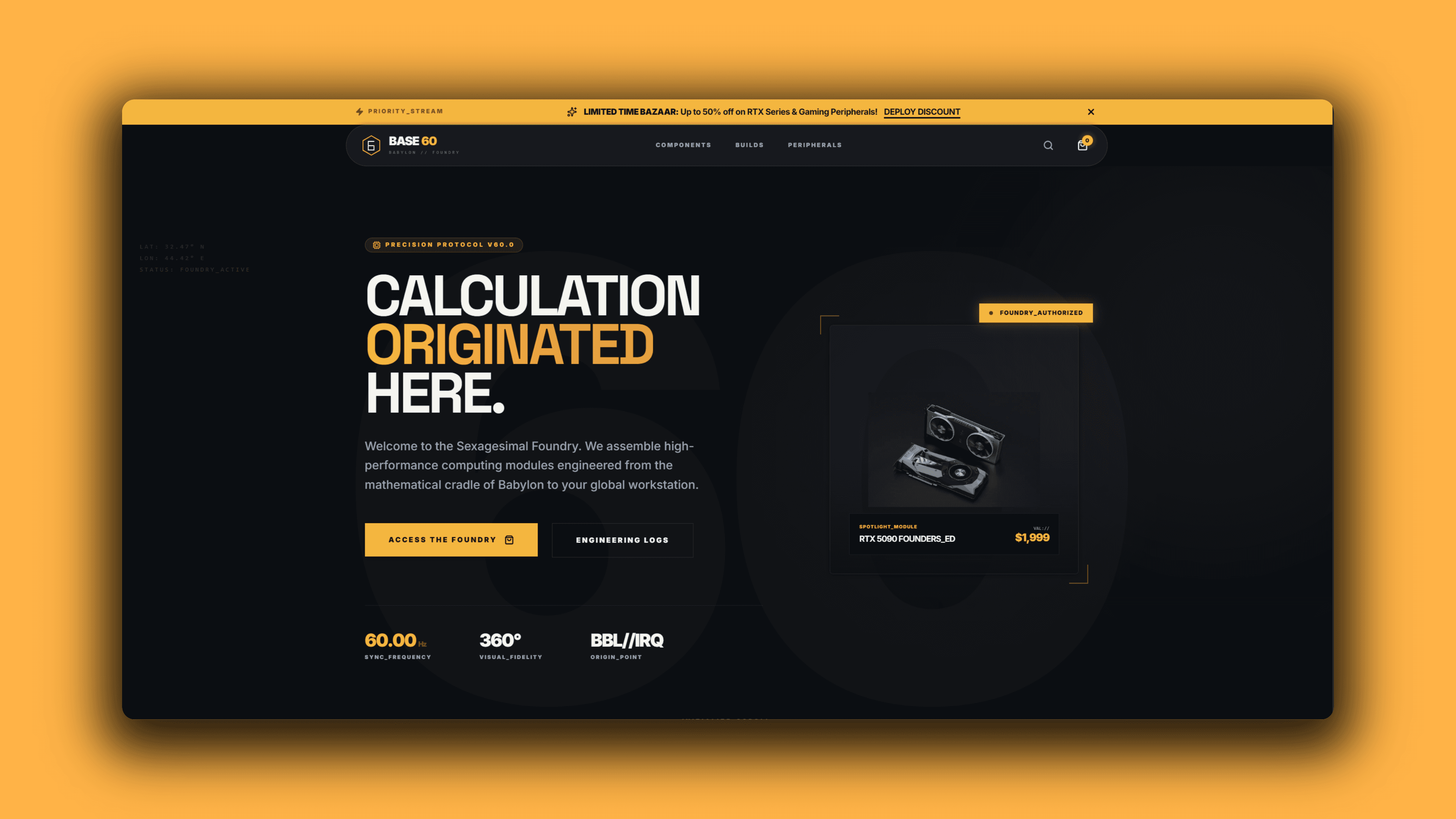
Why I ditched rounded corners and drop shadows for 1px grids and monospace data. A case study in building a high-immersion 'Overseer' UI for BASE 60.
Modern e-commerce has a "uniform." White backgrounds, soft rounded corners, playful illustrations, and friendly sans-serif fonts. It’s clean, but it’s generic.
For BASE 60, a platform selling high-performance PC hardware (RTX 4090s, Ryzen 9s), "friendly" was the wrong vibe. Hardware is precision-engineered, sharp, industrial, and expensive. The interface needed to reflect the product.
I set out to build an interface that didn't feel like a store, but like a "Command Terminal." Here is how I architected the Foundry Design System.
1. The "Overseer" Mental Model
The first step wasn't CSS; it was semantics. To build an immersive app, I had to rename the core interactions to fit the "Foundry" narrative.
- Admin Dashboard Overseer Terminal
- Shopping Cart Logistics Manifest
- Product List Hardware Registry
- "Add to Cart" "Initialize Deployment"
This wasn't just flavor text; it dictated the UI layout. A "Registry" implies a dense data grid, not a loose grid of cards. A "Manifest" implies a line-item invoice, not a pop-up modal.
2. The 1px Grid Architecture
Most dashboards use "Cards" separated by margins (whitespace). I inverted this. I wanted the UI to look like a solid control panel where modules are separated by physical seams.
I utilized Tailwind's grid system with a specific trick: The 1px Gap Border.
tsxSnippet// The Foundry Grid Pattern<div className="grid grid-cols-1 gap-px border border-white/10 bg-white/10 md:grid-cols-3"> {/* The background color of the parent (white/10) bleeds through the gap-px, creating the border */} <div className="bg-[#0A0E14] p-6"> <Metric label="Revenue" value="$12k" /> </div> <div className="bg-[#0A0E14] p-6"> <Metric label="Stock" value="98%" /> </div> <div className="bg-[#0A0E14] p-6"> <Metric label="Nodes" value="Active" /> </div></div>
This creates razor-sharp, 1-pixel lines between components that scale perfectly on any device, mimicking the look of a technical blueprint or a PCB layout.
3. Typography as Infrastructure
Typography in a technical app isn't just for reading; it's for scanning data.
I implemented a "Triple-Stream" font stack using next/font:
- Display (Space Grotesk): For aggressive, industrial headers.
- Sans (Inter): For dense body text.
- Mono (Geist Mono): The most critical font. I used this for every data point—prices, IDs, dates, and status flags.
cssSnippet/* Globals.css - Enforcing the 'Terminal' look */input,code,.terminal-data { font-family: var(--font-mono); text-transform: uppercase; letter-spacing: 0.05em;}
By forcing uppercase and monospace on data, a price tag $1,999.00 aligns perfectly with an ID #BBL-01, creating a sense of mathematical order.
4. Hardening the Components (Shadcn Customization)
I used Shadcn UI (Radix) for accessibility, but I stripped away its default "Software" look (rounded corners, white backgrounds).
For example, the Select Menu. The default browser dropdown breaks immersion. I built a custom FoundrySelect that mimics a hardware switch.
tsxSnippet// components/ui/inputs/foundry-select.tsxexport function FoundrySelect({ ...props }) { return ( <Select> <SelectTrigger className="h-12 w-full rounded-none border-white/10 bg-white/[0.02] font-mono text-xs focus:border-[#FFB400]/40"> {/* ... */} </SelectTrigger> {/* The Dropdown Panel */} <SelectContent className="rounded-none border-white/10 bg-[#0A0E14] shadow-2xl"> {options.map((opt) => ( <SelectItem className="cursor-pointer rounded-none font-mono focus:bg-[#FFB400] focus:text-black" {...opt} /> ))} </SelectContent> </Select> );}
Now, when a user selects a country, it feels like they are locking in a GPS coordinate, not just filling a form.
5. Kinetic Feedback
Static industrial interfaces can feel dead. To solve this, I added "Kinetic Beams" to primary actions.
Using a simple CSS animation within a framer-motion wrapper, I created a diagonal beam of light that sweeps across buttons when the system is "Processing" or "Ready."
tsxSnippet{ /* The Kinetic Beam */}<div className="absolute inset-0 overflow-hidden"> <div className="animate-shimmer absolute -inset-full top-0 block h-full w-1/2 -skew-x-[30deg] transform bg-gradient-to-r from-transparent via-white/20 to-transparent" /></div>;
The Result
The result is BASE 60—an interface that respects the intelligence of its user. It doesn't hold your hand with soft edges; it hands you a tool. By aligning the UI design with the subject matter (high-performance engineering), the site builds immediate trust with its target audience: the builders, the overclockers, and the architects.